TNREGINET portal (https://tnreginet.gov.in) என்பது Tamil Nadu Registration Department develop பண்ணிய ஒரு user-friendly online platform. இது mainly property-related services & registration services easy and fast ஆக residents of Tamil Naduக்கு available பண்ணுது.
இந்த portal use பண்ணினா, government officeக்கு நேர்ல போன தேவை இல்ல. எல்லா services-யும் onlineலே கிடைக்கும். இது transparency, efficiency, accessibility மூன்றையும் உறுதி பண்ணுது.
TNREGINET Registration – எப்படி Register பண்ணுவது?
TNREGINET services use பண்ணணும்னா, முதலில் ஒரு account create பண்ணணும். Steps கீழே:
- Visit: https://tnreginet.gov.in
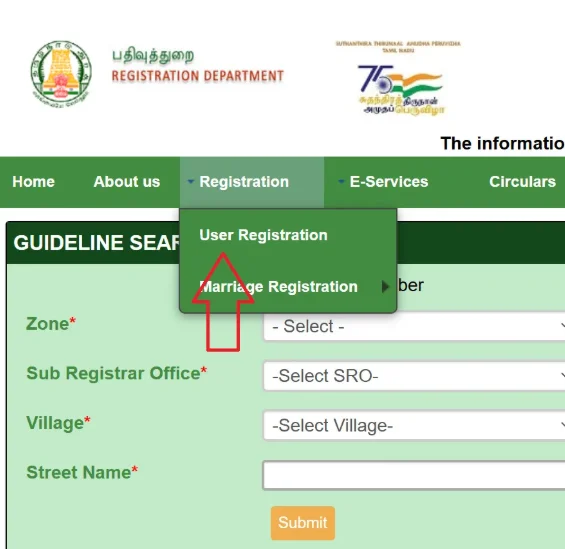
- Homepageல Registration → User Registration option select பண்ணுங்க.
- User Type choose பண்ணவும் (உதாரணம்: Citizen, Document Writer, Builder).
- தேவையான details fill பண்ணுங்க:
- Username, Password, Security Question
- Name, Email, Mobile Number, ID Proof
- Form submit பண்ணிட்டு, உங்க Email/Mobileக்கு வரும் OTP use பண்ணி verify பண்ணவும்.
- Verification complete ஆன பிறகு, உங்க Login Credentials use பண்ணி portalக்கு login பண்ணலாம்.
💡Note: Use the portal within 7 days of registration, or the account may be deactivated. Active users must log in every 3 months to maintain account status.
Property Registration – TNREGINET வழியாக எப்படி செய்யலாம்?
ஒரு property register பண்ணனும்னா (உதாரணம்: Sale Deed, Gift Deed), கீழே கொடுக்கப்பட்ட steps follow பண்ணுங்க:
- Log in to TNREGINET portal.
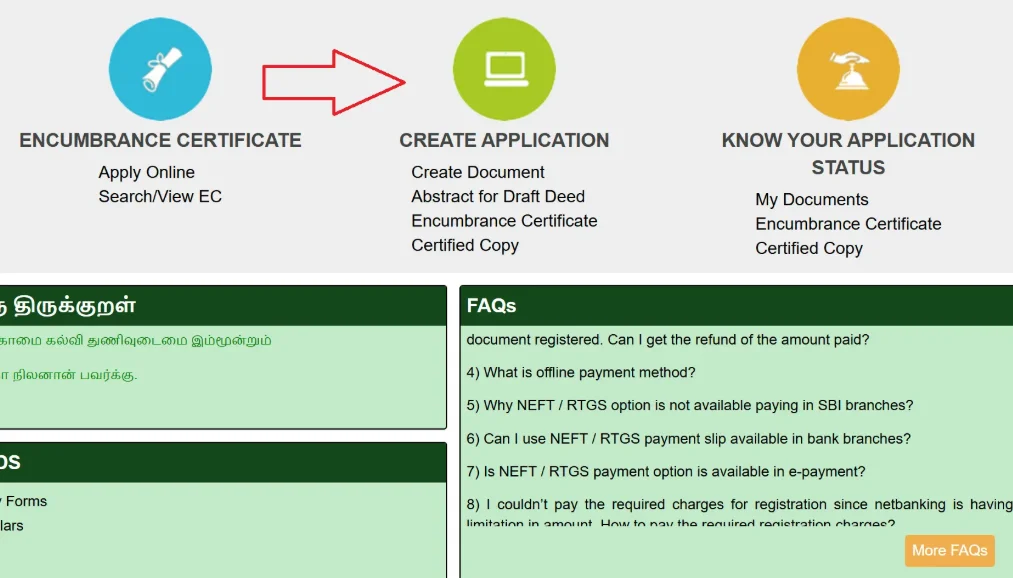
- போய் Create Application → Create Document option select பண்ணுங்க.
- Document Type choose பண்ணுங்க (உதாரணம்: Sale Deed, Mortgage).
- Enter செய்யவும்:
- Property Details (Location, Survey Number etc.)
- Parties Involved (Buyer, Seller).
- தேவையான documents upload பண்ணுங்க (Sale Agreement, ID Proofs).
- Portalலே இருக்கும் Stamp Duty Calculator use பண்ணி amount calculate பண்ணி online pay செய்யவும்.
- Appointment Book பண்ணுங்க Sub-Registrar Office (SRO) verificationக்கு.
- Application submit பண்ணிட்டு, கிடைக்கும் Reference Number save பண்ணிக்கோங்க (Future Trackingக்கு).
- Last Step → Appointment dateக்கு SRO போய், Final Verification complete பண்ணணும்.
💡Note: Registration fees depend on property type and value, as per Tamil Nadu government guidelines.
View Encumbrance Certificate (EC) – எப்படி பார்ப்பது?
Encumbrance Certificate (EC) ஒரு propertyயின் legal & financial status confirm பண்ணும் முக்கியமான document. இதை TNREGINETல online-ஆ simple stepsல பார்கலாம்:
- Log in செய்யவும் → TNREGINET portal.
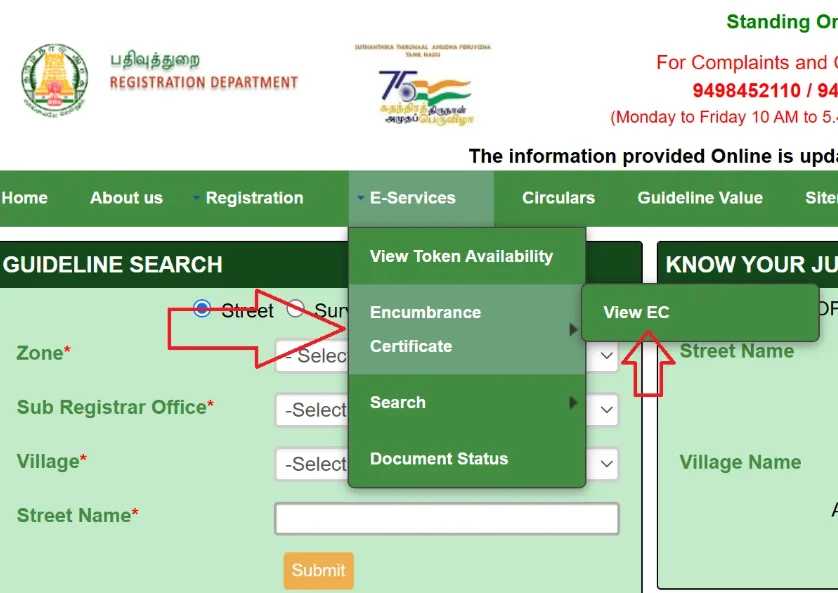
- செல்லவும் → E-Services → Encumbrance Certificate → View EC.
- Search Type select பண்ணவும்:
- EC Search
- Document-wise
- Plot/Flat-wise
- EC Searchக்கு: Enter செய்யவும் → Zone, District, Sub-Registrar Office, EC Start/End Dates, Village, Survey Number, Sub-Division Number.
- Document-wise Searchக்கு: Enter செய்யவும் → Document Number, Year, SRO.
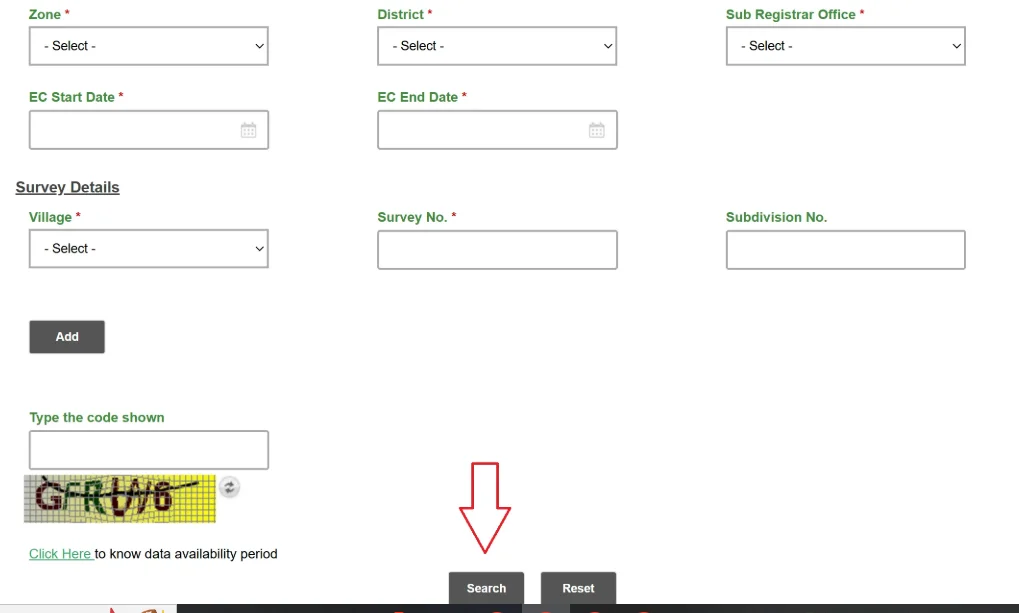
- Captcha Code enter பண்ணி → Search click பண்ணங்க.
- EC result screenல show ஆகும். அதையே PDF Download பண்ணிக்கலாம் → Free of Cost.
💡Note: Certified EC copies may incur a small fee. ECs are available for properties registered in Tamil Nadu only, covering up to 30 years.
Check Guideline Value – எப்படி பார்க்கலாம்?
Guideline Value என்பது அரசு property registrationக்கு fix பண்ணும் minimum value ஆகும். இதை TNREGINET portalல் எப்படி check பண்ணலாம்:
- Visit பண்ணுங்க https://tnreginet.gov.in
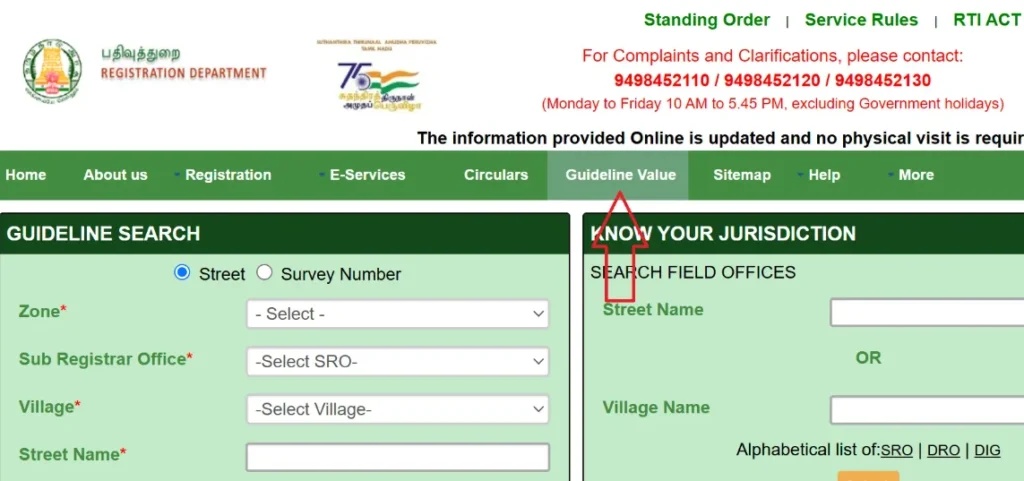
- Homepageல Guideline Value option click பண்ணுங்க.
- ஒரு Date Range select பண்ணவும் (உதா: Latest values வாங்க 01-07-2024 இலிருந்து).
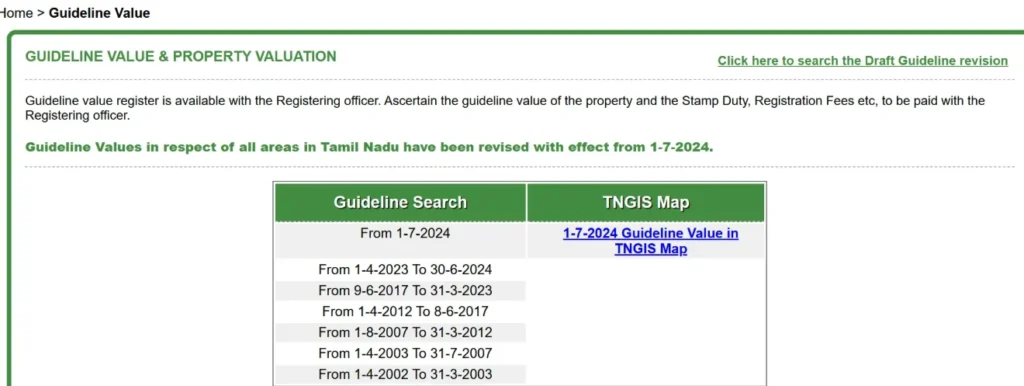
- Enter பண்ணவும்:
- Region
- Registrar Office
- Registration Village
- Street or Survey Number
- Land Classification
- Click Search → அந்த propertyக்கான guideline value வரும்.
- இந்த value use பண்ணி Stamp Duty மற்றும் Registration Fees calculate பண்ண முடியும்.
💡Note: Guideline values were last revised in Tamil Nadu on July 1, 2024.
Document Search and Download – பூர்வ பழைய பதிவுகள் கண்டுபிடி & பதிவிறக்கு
- TNREGINETல Log in பண்ணுங்க.
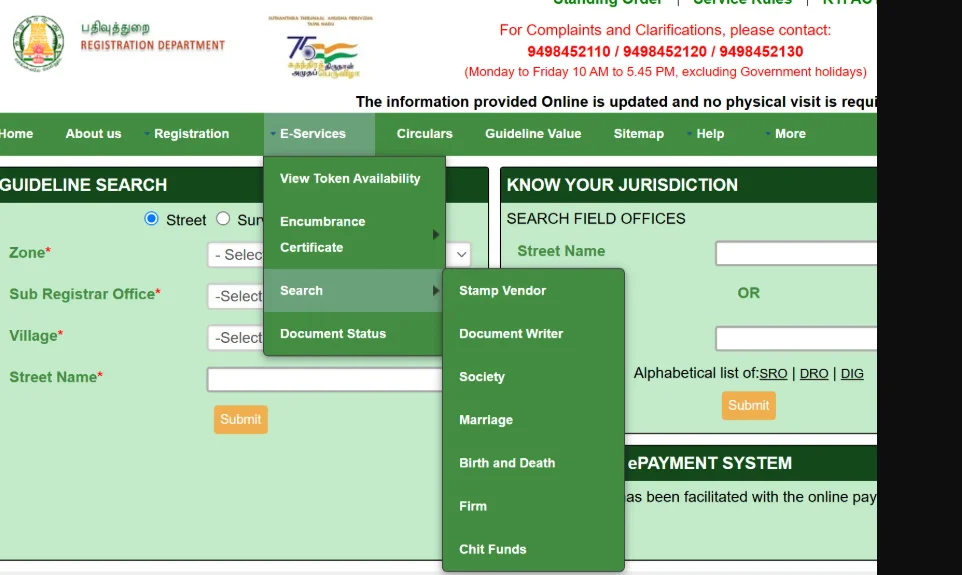
- E-Services கீழ் செல்லவும் → Document Search.
- தேவைப்பட்ட details enter பண்ணுங்கள்: Document Number, Party Names, Property Details.
- Search பண்ணி document பார்த்து, தேவையானபோது Download பண்ணிக்கலாம்.
Marriage, Birth & Death Registration – TNREGINET வழியில் பதிவு செய்வது
- Portalல Log in பண்ணவும்.
- செல்லவும் → Create Application → Create Document.
- Certificate Type சொடுக்கவும் (Marriage / Birth / Death).
- தேவையான விவரங்கள் (personal details, proof documents) upload பண்ணவும்.
- Application submit பண்ணி, Reference Number மூலம் status check பண்ணலாம்.
Checking Jurisdiction – Sub-Registrar Office எங்கே?
- TNREGINET portalல Log in பண்ணவும்.
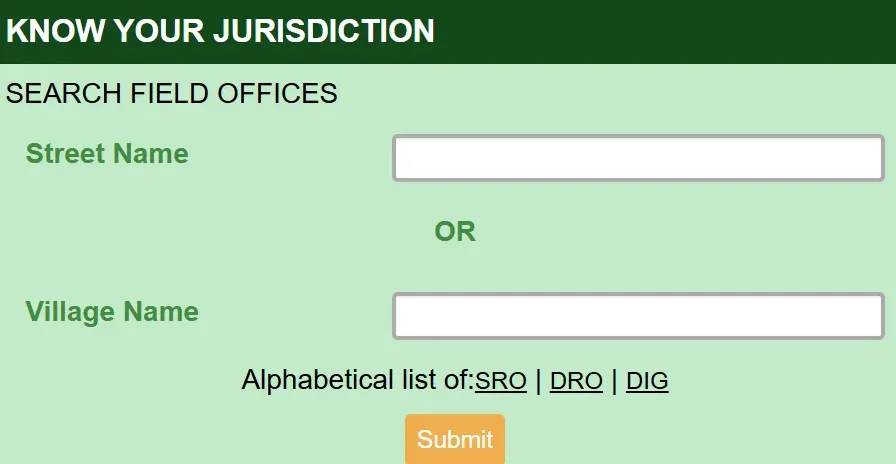
- Homepageல இருக்கும் KNOW YOUR JURISDICTION boxல் செல்லவும்.
- அதில் பற்றி ज़ரியுங்கள்: Property Registration Number, District, Survey Number.
- Search செய்து, அந்த propertyக்கு சம்பந்தப்பட்ட Sub-Registrar Office name & contact details தெரிகிறது.
Calculating Building Value – கட்டிட மதிப்பீடு எளிதில்
- TNREGINET portalல் Log in பண்ணுங்க.
- Homepageல Calculate Building Value என்ற லிங்க் கிளிக் பண்ணவும்.
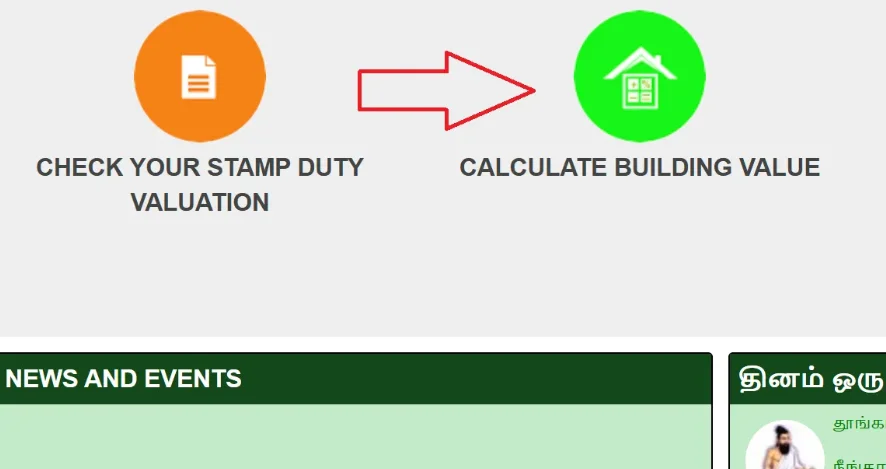
- வேண்டிய details enter பண்ணுங்கள்:
- Building Location
- Size
- Age
- Amenities (Roof Type, Number of Rooms போன்றவை)
- Search button அழுத்தி, அந்த கட்டிடத்தின் கருதி மதிப்பு தெரிந்து கொள்ளலாம்.
TNREGINET Portal – Tamil Nadu Inspector General of Registration Services
TNREGINET, or Inspector General of Registration Services (IGRS) portal, Tamil Nadu govt-ன் Digital India initiative-ல உள்ள ஒரு digital platform. இது உங்கள் property-related பயணங்களையும், Encumbrance Certificate (EC) பெறுதலையும், guideline value check பண்ணுதலையும், மற்ற public services-ஐ எளிதாக்கிறது.
Accessibility & Registration
- TNREGINET portal Tamil Nadu residentsக்கு மட்டும் open.
- பெரும்பாலும் services பயன்படுத்த register ஆக வேண்டும்.
- இது sensitive property & legal documents-க்கு பாதுகாப்பான அணுகலை உறுதிசெய்கிறது.
Portal Details
- Type: Inspector General of Registration Services Portal
- Coverage: Tamil Nadu state residents மட்டுமே
- Services: Property registration, certificates, document verification
- Initiative: Tamil Nadu govt-ன் Digital India program
Key Features of TNREGINET
Core Platform Features
- Online Property Registration: Sale deed, gift deed, mortgage, மற்ற property documents-ஐ digitalல register பண்ணலாம்.
- Encumbrance Certificate (EC): Property legal & financial liabilities இல்லலென்று verify பண்ணலாம்.
- Guideline Value Search: Govt-ல் fix பண்ணிய minimum property registration value பார்த்துக்கொள்ளலாம்.
- Document Verification: Registered documents securely access பண்ணி download பண்ணலாம்.
- Certificate Services: Marriage, Birth, Death, Firms, Societies, Chit Fund registry செய்யலாம்.
- User-Friendly Interface: Technical knowledge எல்லாம் இல்லாதவருக்கும் எளிதாகப் பயன்படுத்தக்கூடிய design.
Benefits
- ⏰ Time Efficient: Process ஆச்சுனா வேகமாக முடியும்.
- 💰 Cost Effective: படிக்க போக கூடாததால் travel cost save ஆகுது.
- 📄 Paperless Process: Physical paperwork மிகவும் குறைவு.
- 🏢 No Office Visits: எல்லா ஓபன் வேலைகளும் online-ஆ முடிகிறது.
Love Language quiz is a quick quiz for couples to discover their love languages and strengthen their connection through better understanding and communication.
You can discover mouthwatering chicken dishes at, baked chicken tenders offering everything from classic roasts to creative twists.For flavorful rice meals, explore, fried rice recipe with quick and easy cooking guides.
Access official online services in Tamil Nadu through,TNReginet, and check land ownership details via the patta chitta portal. For all licence-related details, including application, renewal, and status checks, visit driving licence.
EC View – Property Legal Check எளிதில்
TNREGINET மூலம் உடனே உங்கள் property-க்கு legal & financial status verify பண்ணிக்கோங்க; இதில் EC certificate online இலவசமாக பார்வையிடவும், download செய்யவும் முடியும்.
Contact and Support
| Support Type | TNREGINET Helpdesk |
|---|---|
| Phone | 044-24640160 |
| helpdesk@tnreginet.net | |
| Hours | Monday–Friday: 8 AM–8 PM Saturday: 10 AM–5 PM |
| Note | Support available in Tamil and English |